
Hyperedges: accurate answers when a fact has many entities
Agents can make poor decisions when their context has only part of a fact. Most context graphs split a fact about three or more entities into pairs, so a search can return one pair and miss the others. Zep hyperedges keep the full fact together.

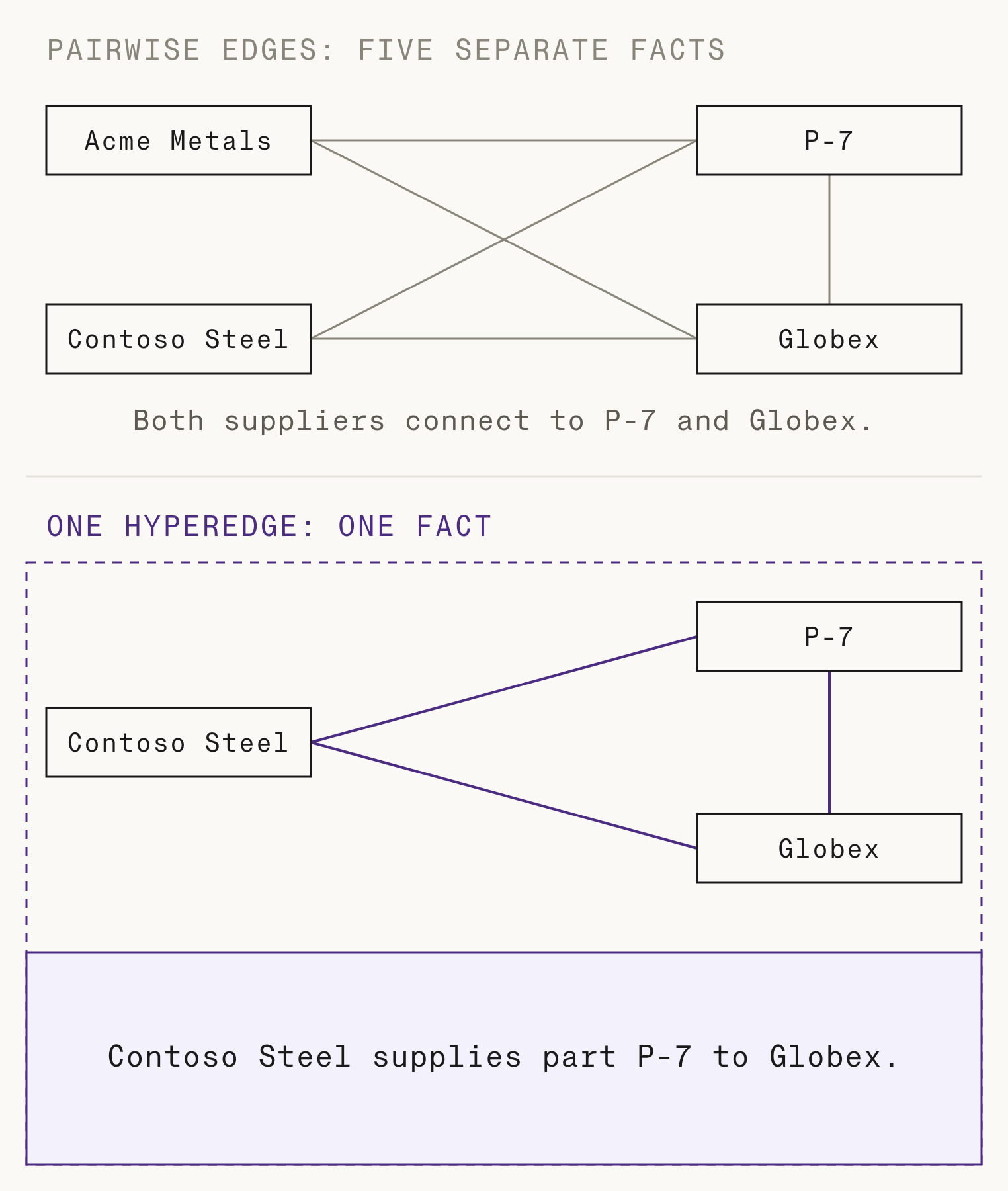
Agents can make poor decisions when their context has only part of a fact. Most context graphs store pairwise edges, each with a subject and an object: "Globex buys part P-7." When a fact relates three or more entities, pairwise edges split it into pairs. For example, "Contoso Steel supplies part P-7 to Globex" becomes three pairs. Other suppliers can share these pairs, so an agent's search can return the pairs and miss which supplier ships part P-7 to Globex. Zep v4 adds hyperedges, which give agents the full fact when it relates three or more entities.
Multi-entity facts in a pairwise graph
A fact in Zep is a time-stamped relationship on a graph edge, and an edge connects two entities. Some facts fit that shape: "Globex buys part P-7." Some facts do not. One supply fact is an example:
Contoso Steel supplies part P-7 to Globex.
The fact relates three entities: the supplier, the part, and the buyer. With pairwise edges only, the graph stores three separate facts:
- Contoso Steel supplies part P-7.
- Contoso Steel supplies parts to Globex.
- Globex buys part P-7.
Each fact is correct alone. A second supplier, Acme Metals, supplies part P-7 to Initech and part Q-3 to Globex. Acme Metals then has edges to the same two entities as Contoso Steel: Acme Metals supplies part P-7, and Acme Metals supplies parts to Globex. The pair "Globex buys part P-7" from the Contoso Steel fact is already in the graph. Both suppliers now have edges to part P-7 and to Globex, so the pairs match both suppliers. Thus the pairs alone cannot show which supplier ships part P-7 to Globex.
Search test: pairwise edges and hyperedges
We put eight supply facts into two test graphs. The facts used three suppliers, three parts, and three buyers. The first graph stored the facts as 23 pairwise edges, one for each distinct pair. The second graph stored each supply fact as one hyperedge. Then we called graph.search_edges with the query "Who supplies part P-7 to Globex?" on each graph.
The top six results from the pairwise graph were:
Acme Metals supplies part P-7.Umbrella Alloys supplies part P-7.Contoso Steel supplies part P-7.Globex buys part P-7.Umbrella Alloys supplies parts to Globex.Contoso Steel supplies parts to Globex.All three suppliers supply part P-7, and all three suppliers supply parts to Globex. Only Contoso Steel supplies part P-7 to Globex. The pairwise edges do not contain that fact, so an agent that reads these results must guess.
The top result from the hyperedge graph was the correct fact:
Contoso Steel supplies part P-7 to Globex.The query "Which parts does Acme Metals supply to Globex?" gave the same pattern. With hyperedges, the top result was "Acme Metals supplies part Q-3 to Globex." With pairwise edges, the results showed that Acme Metals supplies parts to Globex, and that Acme Metals supplies parts P-7, Q-3, and R-2. No result showed which of those parts goes to Globex.
Supply facts are one example. Prescriptions (a doctor, a drug, and a patient), introductions, and price quotes have the same shape: one fact with three or more participants. When other facts share those participants, the pairs cannot show which participants go together.
How hyperedges work
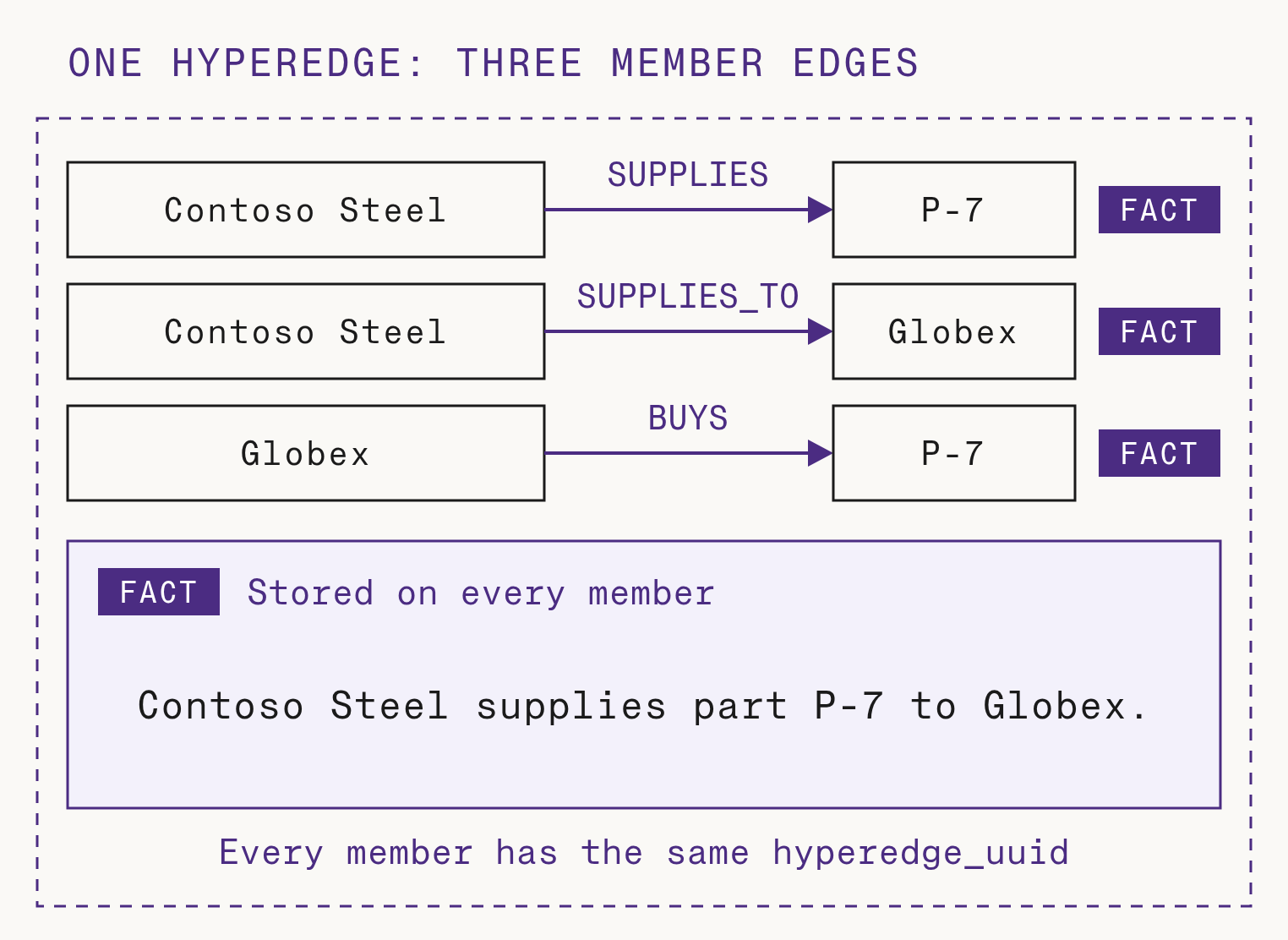
A hyperedge is a group of pairwise member edges that share one fact:
- Each member edge connects two of the entities and has its own name and direction, for example
SUPPLIESorBUYS. - Every member stores the full multi-entity fact, not only the relationship between its two entities. In the supply example, the
SUPPLIESedge and theBUYSedge both store "Contoso Steel supplies part P-7 to Globex." - Every member has the same validity window (
valid_atandinvalid_at). - Every member has the same
hyperedge_uuid.
A search that matches any member finds the full fact, because every member has the full fact. Every search and context method returns each hyperedge once: a raw search returns it as one result, and a Context Block contains the fact one time. Graph traversal, filters, and the edge ontology work on the member edges as before, so existing queries do not change. When the fact changes or becomes invalid, Zep writes the change to every member edge.
Add a hyperedge with the SDK
Use graph.hyperedge.add when a fact relates at least three distinct entities. The request has the fact and one entry for each member edge:
from zep_cloud import EdgeNodeRef, HyperedgeInputfrom zep_cloud.client import Zep client = Zep(api_key="YOUR_API_KEY") result = client.graph.hyperedge.add( "YOUR_GRAPH_UUID", fact="Contoso Steel supplies part P-7 to Globex.", edges=[ HyperedgeInput( name="SUPPLIES", source_node=EdgeNodeRef(name="Contoso Steel"), target_node=EdgeNodeRef(name="P-7"), ), HyperedgeInput( name="SUPPLIES_TO", source_node=EdgeNodeRef(name="Contoso Steel"), target_node=EdgeNodeRef(name="Globex"), ), HyperedgeInput( name="BUYS", source_node=EdgeNodeRef(name="Globex"), target_node=EdgeNodeRef(name="P-7"), ), ],)Zep returns the hyperedge UUID when it accepts the task. The member edges are readable after the task completes. The hyperedges guide has the other graph.hyperedge methods and the TypeScript and Go versions.
Extract hyperedges from episodes
Zep can also find multi-entity facts in the episodes that you add, such as messages, documents, and JSON. The project setting Enable Hyperedges controls this extraction. New projects have the setting on. For an older project, an Account Owner, Account Admin, or Project Admin can turn on the setting in the project settings of the dashboard. The setting is one-way, and it applies only to episodes that Zep receives after the change. The guide has the details.
Hyperedges in the graph view
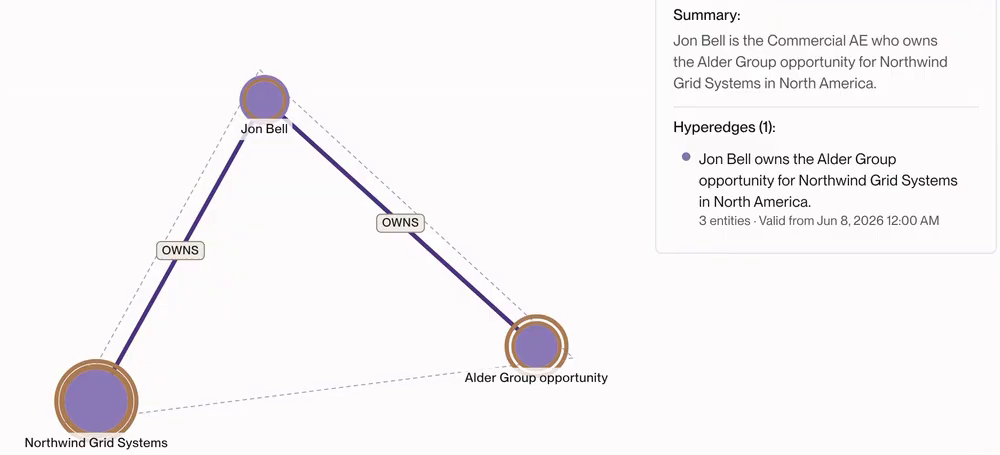
In the graph view of the Zep dashboard, a brown ring marks each entity that is a member of a hyperedge. Select an entity to see its hyperedges in the node details: the fact, the number of entities, and the date when the fact became valid. Select a hyperedge, and the graph outlines its member entities. To see how an agent navigates a graph by its connections, in the API and in the dashboard, read the Zep v4 announcement.
Hyperedge documentation and related posts
The Zep v4 API includes hyperedges. Read the hyperedges guide, and see how facts fit with the other context types. For the research behind the Context Graph, read Zep: a temporal knowledge graph architecture for agent memory.
FAQ
What is a hyperedge in a knowledge graph?
A hyperedge is an edge that connects more than two nodes. In Zep, a hyperedge is one fact that relates three or more entities, such as a supply fact with a supplier, a part, and a buyer. Zep stores the fact on a group of pairwise member edges that share one hyperedge_uuid, so traversal and filters work as before.
When should I use a hyperedge instead of an edge?
Use an edge for a fact about one pair of entities, such as "Globex buys part P-7." Use a hyperedge when one fact has three or more participants and the pairs of the fact cannot show which participants go together. Supply facts, prescriptions, introductions, and price quotes are typical examples. When an entity, such as an order number, connects to every participant, use pairwise edges to that entity. A hyperedge must have at least three distinct entities.
How do hyperedges improve search results?
With pairwise edges, a multi-entity fact becomes separate pairs, and other facts can make the same pairs. A search then cannot show which entities go together. Every member edge of a hyperedge stores the full fact, so a search that matches any member returns the full fact. Every search and context method returns each hyperedge once: a raw search returns it as one result, and a Context Block contains the fact one time.


