

How Zep Context Graphs keep two timelines for every fact
Each fact records when it was true and when it was added to the graph, so agents get the right answer for any point in time.


Many data agents trust the newest context they can find. Of the 15 internal data agents described in Metadata is the easy part of a data context layer, 10 check their context for staleness, and each check tests how recent the context is. A new message, though, can describe a change that applies only from a certain date.
In an example from that post, a data migration in September 2025 changes the key that joins orders to accounts, and a data engineer announces the change in a chat message a week later. An analyst then asks for revenue by account for the first quarter of 2025. The chat message is the newest context about the join key, so an agent that trusts recency applies the new key to orders from before the migration. The query runs and the numbers look plausible, but they are wrong.
| Fact about the join key | When it was true | When it was added |
|---|---|---|
Orders join on account_id | Until the September 2025 migration | January 2025, from a runbook |
Orders join on account_uuid | From the September 2025 migration | A week later, from chat |
The newest fact about the join key is not the one that applied to first-quarter orders.
The table also shows a second problem: the new key reached the graph a week after it took effect. When a team reviews an answer from that week, it needs to know whether the agent ignored the new key or never had it. A Zep Context Graph keeps both dates on every fact, so the team can tell.
How Zep timestamps each fact
Each fact in a Zep Context Graph has two timelines. The event timeline records when the fact was true in the world, and the system timeline records when Zep learned it. Zep extracts facts from each episode that you add: a message, a text document, or a JSON business record. Each fact is an edge that connects the entities in the fact, and each edge has four timestamps, two for each timeline.
| Timestamp | Timeline | Meaning |
|---|---|---|
valid_at | Event time | When the fact started to be true |
invalid_at | Event time | When the fact stopped being true |
created_at | System time | When Zep learned the fact |
expired_at | System time | When Zep learned that the fact stopped being true |
The four timestamps on each fact in a Context Graph.
A database that keeps both timelines is called bitemporal. With the event timeline, an agent can answer "which join key applied to orders in the first quarter?" With the system timeline, a team can answer "which join key did the graph hold on the day a board report ran?" The two answers differ when Zep receives a fact late or receives a correction after a report.
How reference_time dates a fact
reference_time is the time when the source event happened, for example the time when a message was sent or the start time of a meeting. You set reference_time on each episode and each message. If you do not set reference_time, Zep uses the ingestion time.
In this example, a data runbook from January 2025 says which key joins orders to accounts. Priya, a data engineer, posts a message about a change on Monday, September 15. You add both as episodes, each with the time when it was written:
from zep_cloud.client import Zep client = Zep(api_key="YOUR_API_KEY") # A line from the data runbook, written in January 2025client.graph.episode.add( "YOUR_GRAPH_UUID", type="text", data="As of January 10, 2025, orders join to accounts on account_id.", reference_time="2025-01-10T12:00:00Z",) # Priya's message in the data team chat, sent on Monday, September 15, 2025client.graph.episode.add( "YOUR_GRAPH_UUID", type="text", data=( "Data team chat, from Priya (data engineer): Since last Monday, " "orders join to accounts on account_uuid instead of account_id." ), reference_time="2025-09-15T16:20:00Z",)A model reads the text of the episode and uses reference_time to resolve relative dates such as "last week" or "two years ago". In the example, Priya's message is from Monday, September 15, 2025, and the change applies "since last Monday". Zep sets valid_at on the new join-key facts to September 8, 2025.
Zep applies the same rules to other kinds of statements:
- A fact in the present tense, such as "orders join on account_uuid", starts at the
reference_timeof its episode. - A fact that states an end, such as "the discount applies until March 31", gets that date as
invalid_at. - A plan or a deadline, such as "we will move the join next month", starts at
reference_time. Zep keeps the future date in the fact text and does not use a deadline asinvalid_at.
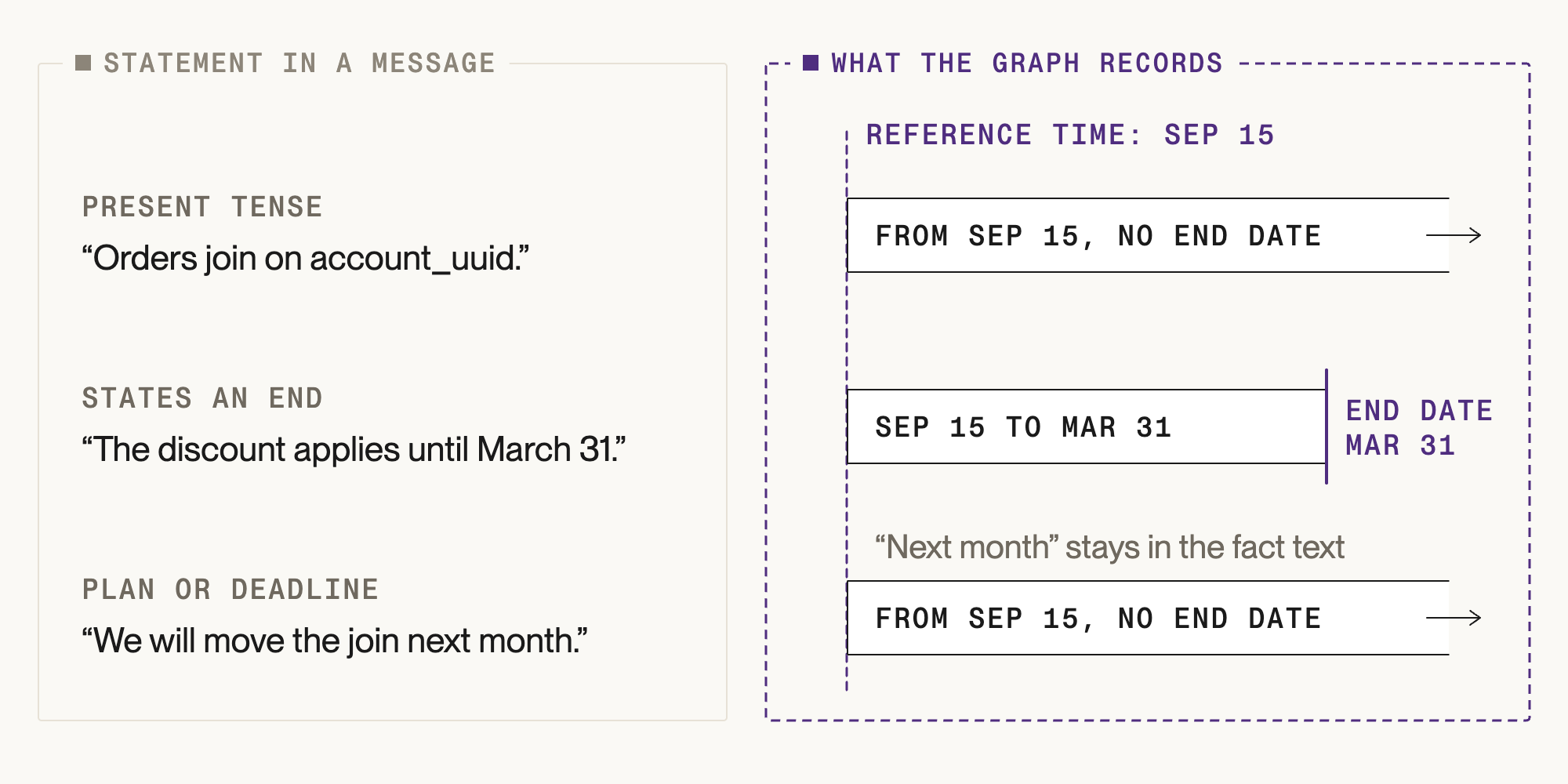
When a new fact contradicts an old fact
When Zep adds a fact, a model compares it with related facts in the graph. If the model finds a contradiction, Zep compares the two valid_at dates. When the new fact starts later, the old fact gets an invalid_at equal to the new fact's valid_at, and an expired_at equal to the current time. The old fact stays in the graph.
After Priya's message, the graph contains two facts about the join key:
- Orders join on
account_id: valid from January 10, 2025, to September 8, 2025, and expired when Zep read the chat message. - Orders join on
account_uuid: valid from September 8, 2025, with no end date.
An agent gets the old key for a question about the first quarter of 2025, and the new key for a question about today. Each fact keeps a link to its source episode, so a person or an agent can see what changed and why.
The order of ingestion does not change the validity dates. A backfill can deliver an old fact after the fact that replaced it. When the graph already holds a contradicting fact that starts later, Zep ends the incoming fact on that start date. The event timeline comes out the same in either order, and only created_at and expired_at show the order in which Zep read the sources.
Querying facts by date
The event timeline answers what was true at a given time, and the system timeline answers what Zep knew at that time. At 9:00 on September 15, seven hours before Priya's message, the two give different answers. On the event timeline, account_id had already stopped being true, because the migration happened the week before. On the system timeline, the graph still held account_id as current, because Zep had not read the message yet. Graph search with date filters queries each timeline:
from datetime import datetime, timezonefrom zep_cloud.types import DateFilter, DateFilterGroup, DateFilters, EdgeSearchFilters def search(*conditions): return client.graph.search_edges( "YOUR_GRAPH_UUID", query="Which key joins orders to accounts?", filters=EdgeSearchFilters( date_filters=DateFilters(any_of=[DateFilterGroup(all_of=list(conditions))]) ), ) def true_on(t): # The fact started on or before t, and it has no end or it ended after t. started = DateFilter(field="valid_at", operator="lte", value=t) no_end = search(started, DateFilter(field="invalid_at", operator="is_null")) later_end = search(started, DateFilter(field="invalid_at", operator="gt", value=t)) return [*no_end, *later_end] # Event timeline: the join key for first-quarter ordersq1_facts = true_on(datetime(2025, 3, 31, tzinfo=timezone.utc)) # Event timeline: the join key todaycurrent_facts = true_on(datetime.now(timezone.utc)) # System timeline: the facts that Zep has closedclosed_facts = search(DateFilter(field="expired_at", operator="is_not_null"))For the first quarter, true_on returns the account_id fact, which is valid from January 10 to September 8, 2025. For today, it returns the account_uuid facts, which are valid from September 8. The closed-facts search returns the account_id fact. Its created_at is the time when Zep read the runbook, and its expired_at is the time when Zep read Priya's message. When you run this example, the two times are only seconds apart, because the code adds both episodes at once. A team can compare expired_at with the time of a report to find the facts that changed after the report ran. The system timeline starts when you start sending data to Zep. For history loaded in a backfill, created_at is the day of the backfill.
The Context Block that an agent retrieves also includes the valid_at and invalid_at dates of each fact, so the agent sees the event timeline without a filter.
Setting reference_time for each source
Zep calculates the validity dates from reference_time. For each source, send the time of the original event:
- For chat and email, send the time when the message was sent.
- For meeting transcripts, send the start time of the meeting.
- For business records, send the time of the event that the record describes, such as the signature date of a contract.
- For a backfill with the Batch API, send the original time on every item. Without
reference_time, a fact with no explicit date in the text starts on the day of the backfill.
Getting started with both timelines
A recency check tells an agent which context is newest. The two timelines tell it which fact applied in the period of the question, and what the graph knew at the time. Every fact in a Zep Context Graph has both. Send reference_time with each episode and message, and query either timeline with date filters. The facts documentation describes the four timestamps, and the graph search documentation covers date filters.
FAQ
What is the difference between reference_time and valid_at?
reference_time is a value that you send with an episode: the time when the message was sent or the event occurred. valid_at is a value that Zep calculates for each fact extracted from the episode. Zep uses reference_time as the anchor to resolve relative dates in the text. A message sent today about "last week" gives a fact with a valid_at in the previous week.
What happens if I do not set reference_time?
Zep uses the ingestion time as the reference time. For live data, the ingestion time is near the event time, and the difference is small. For historical data, a fact with no explicit date in the text gets a valid_at near the day of ingestion. When two such facts contradict, Zep can close the newer fact instead of the older fact. Set reference_time on each item when you load history.
Does Zep delete a fact that a newer fact contradicts?
Zep keeps the old fact. Zep sets the invalid_at of the old fact to the start date of the new fact, and sets the expired_at of the old fact to the time when Zep found the contradiction. An agent can still retrieve the old fact for a question about the period when the old fact was true.
What is the difference between invalid_at and expired_at?
invalid_at is on the event timeline: the time when the fact stopped being true in the world. expired_at is on the system timeline: the time when Zep learned that the fact stopped being true. A rule that changed in March and appeared in a chat message in May has an invalid_at in March and an expired_at in May.
How do I find the facts that were true on a given date?
Search edges with date filters. A fact was true at time T if its valid_at is on or before T and its invalid_at is empty or after T. One filter can't combine the empty check and the date check on invalid_at, so send two searches that both keep valid_at on or before T: one with invalid_at empty, and one with invalid_at after T. For the facts that Zep held at T, run the same pair with created_at in place of valid_at and expired_at in place of invalid_at.


