
Everything we shipped in the Zep Context API
Zep v4 is the Context API for agents. This post explains each new feature and how the features help agents make better decisions with Zep Context Graphs.

Business knowledge is in many systems. One customer has a different name in each system, imported records describe events from years ago, and a long document arrives as many chunks. The new features give you controls for each of these problems when you build a shared Context Graph for your agents.
Entity type hierarchies
You can now arrange custom entity types into parent types and subtypes. A large domain ontology stays organized, and an agent can query at the level of detail that a question needs.
Animal├── Mammal│ ├── Ape│ └── Dog└── BirdAn entity type hierarchy with three levels. A node of type Dog also gets the labels Mammal and Animal.
An extracted node gets every label in its type chain. A filter on a parent type therefore also matches the nodes of its subtypes. In the example, a filter on Mammal returns apes and dogs, and a filter on Animal returns all of the nodes.
Set the hierarchy with entity_type_hierarchy on project.set_ontology or graph.set_ontology. A hierarchy can have up to four subtype levels below a top-level type, and each type can have up to 10 direct subtypes. Subtypes do not count against the entity type limit.
Entity type hierarchies are in closed beta for select accounts. To ask for access, contact Zep sales. The entity type hierarchy docs give the full rules.
Ask questions about a graph in the dashboard
The graph visualizer in the dashboard now has a chat panel. The graph assistant answers read-only questions about the graph that you have open, and the panel shows each search and read step as the assistant runs it. To open the panel, click Ask graph in the visualizer.
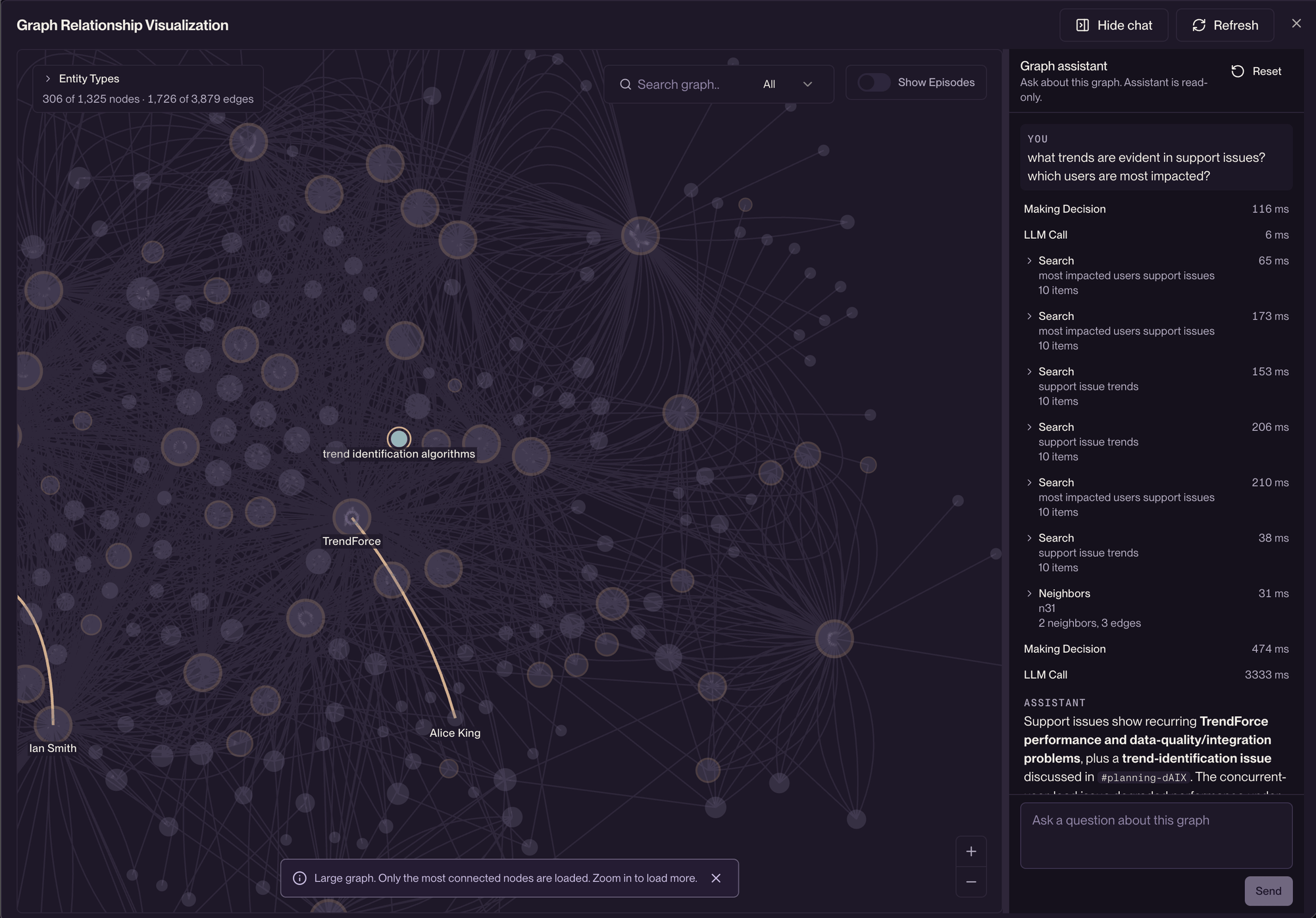
Use the assistant to inspect what Zep extracted, see how two entities connect, and find the source episodes behind a fact. Do these checks before you write retrieval code. The assistant cannot add, change, or delete graph data.
The panel also shows how an agent can use a Zep graph. Your agent can use the same graph search and graph read operations through the API and the SDKs.
The assistant is in limited rollout. See Graph visualizer assistant.
Group the chunks of a document with document_id
Best practice when sending Zep large documents is to chunk them. Zep now allows you to use a single document_id to group chunks, and ingestion of later chunks sees the context from earlier chunks. You no longer have to provide this context manually.
A document groups episodes in the same way that a thread groups messages. A document can be the pages of a PDF, a Slack thread, or an email thread. Pass document_id on graph.episode.add and on batch graph_episode items. Zep also keeps an incremental summary of each document.
client.graph.episode.add( zep_graph_uuid, type="text", data="Alice joined Acme Corp as a designer.", document_id="handbook-v1",)client.graph.episode.add( zep_graph_uuid, type="text", data="She reports to the product team in Austin.", document_id="handbook-v1",) for summary in client.graph.document_summary.list(zep_graph_uuid): print(summary.document_id, summary.summary)Based on the examples in Documents.
In the example, the second chunk refers to Alice only as "She". Both chunks have the same document_id, so Zep resolves "She" to Alice. To list the episodes of one document, use graph.episode.list_for_document. Use a stable identifier from the source system as the document_id, for example a file name and a version.
Merge entities by identity
Two systems can name one customer in different ways, for example "Acme" in the CRM and "Acme Incorporated" in billing. When Zep matches on names only, one customer can become two nodes.
Identity properties make deduplication deterministic. An identity property is a value, such as account_id, that identifies one real-world entity. When the identity values of an extracted entity match an existing node, Zep merges the two entities. Zep does not depend on name similarity for that match.
- Zep compares string identity values without regard to case and extra whitespace.
CITIZENS FINANCIAL GROUP, INC.andCitizens Financial Group, Inc.match. - Two entities with the same generic name, such as "auto loan", merge without a model check only when they share a neighbor.
Strict ontology mode limits entities to your configured entity types. When you have configured edge types, Zep also limits edges to those types. Set strict_ontology to true on graph.episode.add, thread.add_messages, or batch.create. The default value is false.
With both controls, a team that shares one graph across many agents gets one node for each customer and a graph that matches its schema.
Keep values from your system of record
Ingestion merges new information into existing nodes. By default, a new extracted value can replace a stored value, so a later conversation can change a legal name that you imported from your CRM.
Set protected: true on an entity type property to keep its stored value. Ingestion fills a protected property only when the stored value is empty. Identity properties are always protected.
This Customer type uses both features. account_id identifies the customer, legal_name is protected, and ingestion can replace support_tier:
from zep_cloud.types import EntityProperty, EntityType customer = EntityType( name="Customer", description="A customer account.", properties=[ EntityProperty( name="account_id", type="text", description="The account ID in the billing system.", ), EntityProperty( name="legal_name", type="text", description="The registered legal name of the customer.", protected=True, ), EntityProperty( name="support_tier", type="text", description="The current support tier, for example: standard or premium.", ), ], identity_properties=["account_id"],) client.project.set_ontology(entity_types=[customer])Based on the example in Protected properties.
Set the ontology before you ingest data. An ontology change applies only to data that Zep processes after the change.
Put backfilled history at the correct time
Zep keeps two times for each fact: when the fact was true in the world, and when Zep learned the fact.
| Field | Meaning |
|---|---|
valid_at | The real-world time when the fact started to be true |
invalid_at | The real-world time when the fact stopped being true |
created_at | The time when Zep learned that the fact was true |
expired_at | The time when Zep learned that the fact was false |
From Searching the graph.
Data that you import today can describe events from years ago. Pass reference_time on episodes, messages, and batch items to put backfilled history at the correct point on the timeline. The value is the original event time in RFC3339 format. When reference_time is absent, Zep uses the ingestion time.
result = client.graph.episode.add( zep_graph_uuid, type="json", data=json_string, reference_time="2025-06-01T13:11:12Z",)From Setting data timestamps.
With reference_time, fact invalidation and time-based queries are accurate for historical imports and for live data. See Preserve original event time.
Relative dates in auto search
graph.get_context now reads phrases such as "last week" or "yesterday" as a time window, and limits the retrieved facts to that window. An agent can answer "What happened last week?" without a date filter.
Zep uses the time zone of the user or graph first, then the project default, then UTC. The context block states the UTC interval and the time zone that Zep used. When Zep is not sufficiently confident about the time window, Zep runs normal auto search. A time filter that the caller supplies takes precedence. See Relative time in auto search.
Trace an entity to its source episodes
Each entity node now returns episode_uuids: the episodes that mention the entity, newest first. You can trace any entity back to the data that produced it, for audits, citations, and debugging.
For example, an agent says that Acme has premium support, and the value is wrong. The Acme node lists the episodes that mention Acme. You get those episodes and find the CRM record or the conversation that supplied "premium".
Each fact on an edge already links to its source episodes. When a node has more than 100 mention episodes, the list holds the newest 100, and episode_uuids_truncated is true. See the source traceability guide and How Zep tracks provenance in agent memory.
Steer how Zep writes observations (experimental)
Observations are durable patterns that Zep derives from the evidence in a graph. Observation steering guides how Zep words and categorizes these observations. There are two controls:
- A free-text instruction of up to 2,000 characters shapes the wording and relevance of observations.
- Up to 10 named observation types label each observation. Search can filter on these types. When no type fits, Zep uses
generic.
You can set steering for a project or for one graph. Steering does not change which evidence Zep uses, and the instruction cannot add facts. Steering applies only to observations that Zep generates after you set it.
Observation steering is an experimental API on the Flex Plus and Enterprise plans. See Steering observations.
New models and controls for BYOM
With Bring Your Own LLM (BYOM), Zep sends inference requests through LLM credentials that you manage. Enterprises keep their negotiated contracts and their policies for data residency and governance. BYOM supports OpenAI, Azure OpenAI, Google Gemini, Google Vertex AI, Anthropic, and AWS Bedrock (Anthropic models).
These models and controls are new:
- An agent model for the graph assistant. Ingestion continues to use the primary and fallback models.
- The Other option accepts a model ID that is not in the list, for example a model that your gateway exposes.
- A project can override the account defaults for providers, models, and token limits.
- The OpenAI base URL accepts a regional host, such as
https://eu.api.openai.com/v1.
BYOM is an Enterprise add-on. See Bring Your Own LLM.
Set up enterprise SSO from the dashboard
Account Owners can now set up OIDC single sign-on (SSO) in the dashboard. After setup, your identity provider (IdP) controls who can access the Zep account. To set up SSO, go to Account > Settings > Enterprise SSO:
- Enter the issuer URL, the client ID, and the client secret of your IdP.
- Request the email domains of your organization. Each submission can have up to 20 domains.
- Wait for Zep to approve the domains and enable the connection.
Enterprise SSO is available on managed cloud. BYOC deployments set up sign-in through the deployment configuration. Sign-in to a Context MCP Server is a separate connection, described in Unified agent memory in any MCP client. See Enterprise SSO.
Also in v4
The Zep v4 launch post covers graph navigation, debug logs and Ingestion Traces, Zep UUIDs, stable error codes, and the migration from v3. The hyperedges post covers facts about three or more entities. To start, install the v4 SDK for your language and read the migration guide.
FAQ
Must I set protected on identity properties?
No. Zep always keeps the stored value of an identity property after the value is set. Ingestion fills an identity property only when the stored value is empty. Set protected: true on other properties, such as a legal name, when ingestion must keep the value that you imported from your system of record.
Does a new ontology change the data that is already in the graph?
No. An ontology change, such as a new identity property or a protected property, applies only to data that Zep processes after the change. Zep does not extract existing data again. Set your entity types, identity properties, and protected properties before you ingest the data that must use them.
Can I pass a document_id on thread messages?
No. On a user graph, a thread already groups the messages of a conversation. Pass document_id only on graph.episode.add and on batch graph_episode items. The value must have 1 to 100 characters. The same document_id on two different graphs identifies two different documents. Do not use a document_id for records that only share a folder, a customer, or an export.
Does observation steering change the evidence for an observation?
No. The steering instruction shapes the wording and relevance of observations. The instruction cannot add facts, select the evidence, or change the number of observations. The evidence always comes from the graph. Steering applies only to observations that Zep generates after you set it.


